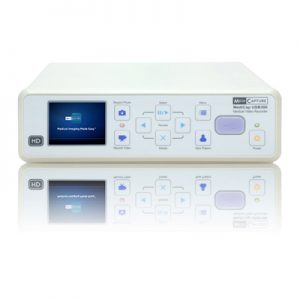
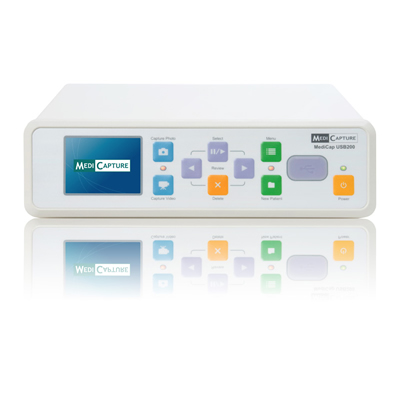
- Records still images & video in standard definition from medical video sources.
- Records to USB flash drive (included) or USB hard drive (not included)
- Image formats: JPG, TIF, PNG, DICOM
- Video formats: H.264
Brochure:
Brochure:
The MediCap USB200 lets you easily record DVD-quality video and still images from your existing medical imaging equipment. It works with ultrasounds, endoscopes, intraoral cameras, surgical microscopes, etc.
The USB200 is very easy to use. No special training or installation is needed. Plug the USB200 into your imaging equipment and press a button or tap a footswitch to start saving video and still images – it’s that simple! Your video and images are saved to a convenient USB flash drive. Remove the drive from the USB200 and insert it in the USB connector on your laptop or PC. It’s a snap to transfer the captured files and start harnessing the power of digital imaging.
With the USB200, you’re no longer limited to paper or film-based images – and you can stop fussing with clumsy VCRs and DVD recorders. Now you can easily archive digital images and videos right on your hard drive or on a secure network. You can enhance them, edit them, email them, include them in patient reports, etc.
| Device Type | Medical Video Recorder Records video and still images from standard medical video sources to a USB flash drive or optional USB hard drive. |
| Media | Records to USB flash drive (included) or external USB hard drive (not included) |
| Case | Rugged metal case with high-impact plastic faceplate |
| LCD Monitor | 2 1/2” LCD (for video confirmation only; not for diagnosis) |
| Speaker | 200Hz-15KHz, 1W (for audio confirmation only, not for diagnosis) |
| Buttons | Sealed membrane, fluid resistant |
| Video In/Out | PAL or NTSC format using S-video or composite BNC. |
| Audio In/Out | 3.5mm stereo phone jacks |
| Video Format | H.264 (DVD-quality) |
| Audio Format | AAC, 2 channels |
| Image Formats | JPEG, TIFF, BMP, DICOM |
| Image Size |
1280 x 1024, 1024 x 768, 800 x 600, 640 x 480 pixels |
| USB Support | USB2.0, high speed, 1 front connector, 3 rear connectors |
| Networking | Ethernet T10/100 connection via Network Upgraded Kit (optional) |
| Footswitch/ Trigger Support |
Standard 3.5mm mini jacks (one for photos, one for videos) (footswitches optional) |
| Mechanical | Size: 240 x 200 x 63mm / 9.5 x 7.9 x 2.5” Weight: 1.7kg / 3lb 12oz |
| Environmental | Storage: -40° to 85° C Operating: -20° to 40° C |
| Power | AC 100-240V 50/60Hz 20W 3-prong AC jack |
| Certifications | CE 93/42/EEC, IEC 60601-1:2005, ANSI/AAMI ES60601-1:2005, CAN/CSA C22.2 No.60601-1:2008, E361228, FCC Part 15, FDA Class 1, RoHS |
| Kit Contents | MediCap USB200 USB flash drive Power cable Video cables User guide |
Rentals MD offers the rentals you need quickly and cost-effectively. Our rentals are available in both short-term and long-term rental options with nationwide service. All of our rentals include costs of service and maintenance and even offer the ability to earn equity in your rental (rent-to-own). For more details simply give us a call or request a quote.
| Brand | Medicapture |
|---|---|
| Model | USB200 |